Automated social media posting is the practice of writing once, scheduling once, and letting software publish to LinkedIn, X, Instagram, Facebook, and TikTok on your behalf at the right time in each audience's timezone. The setup is not the bottleneck most people think it is. The bottleneck is content. This guide walks you through connecting all five channels through ACA Autopilot via GHL, configuring timezone-aware schedules, and handling failures so you stop losing posts to silent errors.
Short answer: Connect your five social accounts to a GHL sub-account, link that sub-account to ACA Autopilot, build a content blueprint per channel, set a posting cadence with peak-time slots in your audience timezone, and turn on retry-on-failure. Once configured, the system publishes 7 to 30 posts per channel per month without you logging into any of the apps. Total setup time: 45 to 90 minutes.
What automated social media posting actually solves
If you post manually, you have three problems. First, you forget. Second, you batch-post at whatever time you happen to be at your laptop, which is rarely when your audience is awake and scrolling. Third, you write in a burst on Sunday night and then nothing for nine days because the burst burned you out.
Automation does not fix the content problem. You still need to know what to say. What it fixes is the discipline problem: the gap between deciding to post consistently and actually doing it. A working setup turns posting into a system that runs whether you remember it exists or not.
For agencies running social for clients, the math is brutal without automation. Five clients, five channels each, three posts per week per channel - that is 75 manual posting actions per week. With automation, it is the same number of posts, but the human work collapses into content review and a weekly approval pass.
The five channels and what each one needs
Each platform has its own quirks. Knowing them upfront prevents the most common setup failures.
- LinkedIn: requires a business page connection or a personal profile token. Personal profiles cap automated posts at a few per day before the algorithm starts suppressing reach. Stick to one post per day, peak hours 8-10am and 5-6pm local time.
- X (Twitter): requires API access via a connected developer account. Posts can run multiple times per day. Native images and short text outperform link-heavy posts. Peak windows are wide: 9am, 12pm, and 7pm local.
- Instagram: requires a Business or Creator account linked to a Facebook page. Personal Instagram accounts cannot be automated through any compliant API. Images must be square or vertical, captions under 2,200 characters.
- Facebook: requires a Page (not a personal profile) and admin access. Easiest channel to automate technically, but organic reach is low - treat it as a credibility surface, not a growth channel.
- TikTok: requires a Business account and approval from TikTok's Content Posting API. Video files only - no static images. The API allows direct posting but enforces stricter content rules than other platforms.
ACA Autopilot is the scheduling and publishing layer inside the ACA platform that runs content production and distribution on a recurring schedule. It pulls content from blueprints (templates that define topic, format, brand voice), generates the post via AI, routes it to the right channel through GHL's social integration, and publishes at the configured time. Failures retry automatically with exponential backoff.
How ACA Autopilot connects through GHL
ACA does not maintain direct API connections to each social platform. Instead, it routes publishing through GoHighLevel (GHL), which holds the OAuth tokens for LinkedIn, X, Instagram, Facebook, and TikTok in a single sub-account. This matters because GHL handles token refresh, rate limiting, and platform-specific quirks so you do not have to.
The connection flow has three layers:
- Social accounts to GHL: in your GHL sub-account, go to Settings, then Integrations, then Social Planner. Connect each platform one at a time. LinkedIn and Facebook need page selection. Instagram needs to be linked through the connected Facebook page. TikTok requires Business account approval.
- GHL to ACA: in ACA, add your GHL API key under Integrations. ACA pulls the list of available social channels from that sub-account automatically. If a channel is missing in ACA, it is missing in GHL - fix it there first.
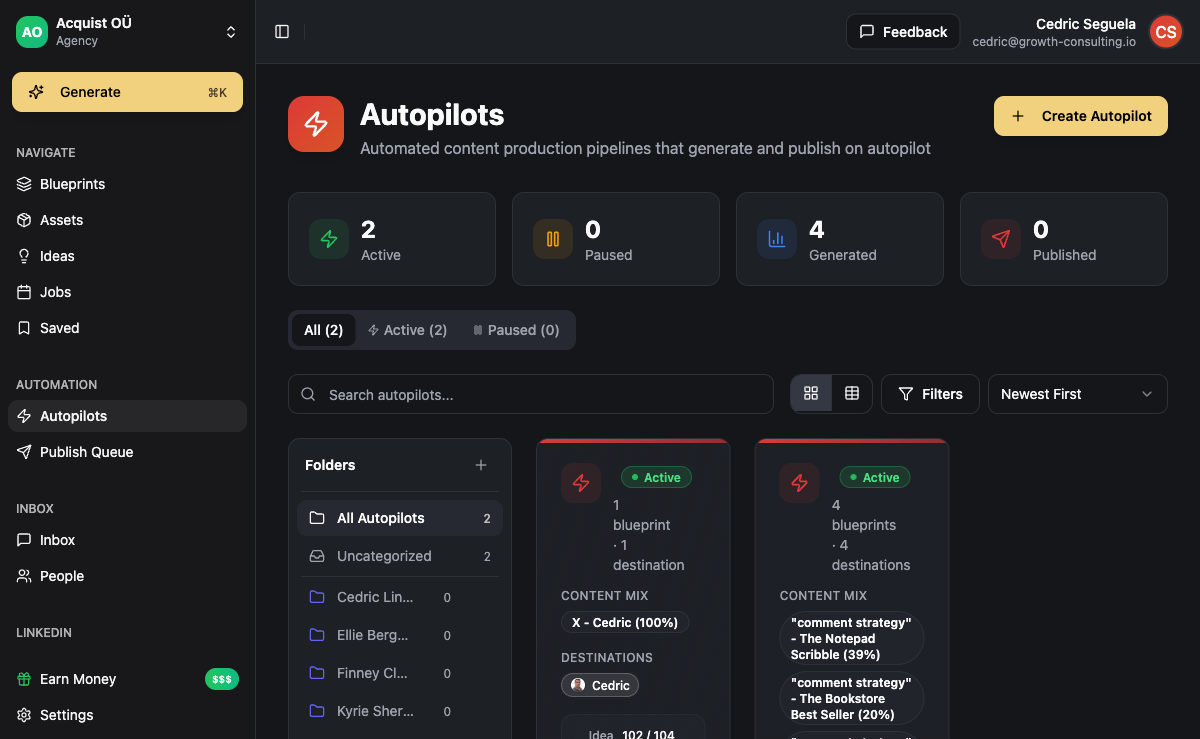
- ACA Autopilot to channels: create an Autopilot, select the blueprint, choose which channels to publish to, set the cadence. The Autopilot runs on the schedule you define, generates content from the blueprint, and dispatches each post to its channel via GHL.
Once this is wired, you never touch the social platforms directly again. All scheduling, queueing, and retry happens inside ACA.
Setting up your first automated post
The first post is the longest because you are configuring the blueprint. Subsequent posts inherit the blueprint and run with no extra effort. Here is the full sequence:
- Create a blueprint. In ACA, go to Blueprints, then New Blueprint. Pick the format (single post, carousel, short video script). Define brand voice in 3-5 sentences: tone, vocabulary to use, vocabulary to avoid, what your audience cares about. Add 2-3 example posts that match the voice you want.
- Add topic sources. Topics can come from a static list, a RSS feed, a Google Doc you update weekly, or AI-generated from a theme you set. For most use cases, a rolling list of 30-50 topics maintained in a connected doc works best - it gives the AI fresh angles without you writing each post.
- Create the Autopilot. Go to Autopilots, then New Autopilot. Select the blueprint. Select the channels (LinkedIn, X, Instagram, Facebook, TikTok - any combination). Set the cadence: daily, 3x per week, weekly. Pick the time slots per channel.
- Approval mode. Decide whether posts auto-publish or require approval. New brands should start with approval mode for the first 2-3 weeks while you tune the voice. Once it consistently produces posts you would have written yourself, flip to auto-publish.
- Turn it on. Activate the Autopilot. It generates the next batch of posts according to schedule. You can review them in the Approval Queue, edit any that need work, and reject the ones that miss.
Timezone handling and peak-time scheduling
This is where most setups quietly fail. Your audience lives in their timezone, not yours. If your client is a US B2B SaaS and you live in Lisbon, scheduling "10am" without specifying timezone publishes at 10am Lisbon - which is 5am Eastern, where their audience is asleep.
ACA Autopilot lets you set the publishing timezone per Autopilot, not per account. This is intentional: a single agency might run one client targeting the US East Coast, another targeting London, and a third targeting Sydney. Each needs its own timezone reference.
Use audience timezone when: your client serves a defined geography (US B2B, UK consumer, APAC enterprise). Set the Autopilot to that timezone. Peak slots are 8-10am and 5-6pm local time for LinkedIn and Facebook; wider windows for X, Instagram, TikTok.
Use distributed timezone when: your audience is global. Schedule multiple posts spread across 24 hours - typically 9am Eastern, 9am London, 9am Singapore - so at least one slot hits prime engagement everywhere.
Peak-time slots by channel, based on aggregated industry benchmarks:
- LinkedIn: Tuesday through Thursday, 8-10am or 5-6pm local. Avoid Friday afternoons and weekends.
- X: weekdays 9am, 12pm, 7pm local. Active throughout the day.
- Instagram: 11am-1pm and 7-9pm local. Stories perform later in the evening.
- Facebook: 1-4pm local weekdays. Lower stakes - reach is limited regardless.
- TikTok: 6-10pm local. Younger audience, evening-heavy.
Retry logic and what happens when a post fails
Posts fail for boring reasons: expired OAuth token, rate limit hit, platform API blip, content flagged by the platform's auto-moderation. Without retry logic, a single failure means a missed post and a hole in your schedule. Worse, you often do not notice for days.
ACA Autopilot's retry behavior:
- First retry: 5 minutes after initial failure, automatic.
- Second retry: 30 minutes later if first retry failed.
- Third retry: 2 hours later.
- After three failures: the post moves to a Failed Posts queue with the error message from the platform. You get a notification in ACA. The Autopilot does not pause - the next scheduled post still attempts to publish.
The most common cause of cascading failures is an expired GHL OAuth token, usually triggered by the user changing their LinkedIn password or revoking access. The fix is reconnecting the channel in GHL, which takes about 60 seconds. Set a calendar reminder to check the Failed Posts queue once per week so issues do not pile up.
Failure rate in our experience: across active Autopilots, roughly 2-4% of scheduled posts fail on first attempt. After the three-retry sequence, fewer than 0.5% remain unpublished. The vast majority of permanent failures trace to authentication issues (expired tokens) rather than content or platform errors.
Channel-specific gotchas to know before you launch
Each channel has at least one quirk that will eventually bite you if you do not plan for it.
- LinkedIn: if you exceed 5 posts in 24 hours from a personal profile, the algorithm suppresses reach for all subsequent posts that day. Schedule 1-2 per day, not more.
- X: link previews require the URL to be in the tweet body, not in an image overlay. The API sometimes strips link previews if the URL is the only content - include at least one sentence of text.
- Instagram: the API does not support Stories via automation, only Feed posts, Reels, and Carousels. If your strategy depends on Stories, you still need a human posting those.
- Facebook: Pages with under 10,000 followers see organic reach of around 1-3%. Do not measure Facebook success by reach. Treat it as a content archive and a signal that the brand is active.
- TikTok: videos uploaded via API enter a separate moderation queue that runs slightly stricter than the consumer app. Avoid borderline content, copyrighted music, and direct competitor mentions in captions.
The weekly rhythm once it is running
A working automated setup turns your social work into a 30-minute weekly review instead of a daily scramble. The rhythm:
- Monday morning: open the Approval Queue. Review the week's generated posts. Edit anything that misses the voice. Reject the bottom 10-20%.
- Mid-week: check the Failed Posts queue. Reconnect any expired tokens.
- Friday: add 5-10 fresh topics to the topic source. Skim performance data - which post types are landing, which are dying.
- Monthly: tune the blueprint based on what worked. Adjust brand voice if the AI is drifting. Swap underperforming time slots.
That is the entire job once setup is done. The system handles the rest.
Frequently asked questions
Can I automate social media posting without GHL?
ACA Autopilot currently routes social publishing through GHL because GHL handles OAuth, rate limiting, and platform-specific edge cases across all five channels reliably. If you already use GHL, the integration is free. If you do not, you can run a stripped-down GHL sub-account just for social, which costs around $97/month at their entry tier. For most agencies, the cost is justified by what GHL handles automatically.
How many posts per channel per month should I schedule?
Realistic minimums for visibility: LinkedIn 12-20 per month, X 30-60 per month, Instagram 12-20 per month, Facebook 8-12 per month, TikTok 8-15 per month. These are floors, not ceilings. The right number depends on how much content you can generate without diluting quality. Three strong posts per week beats seven mediocre ones on every channel except X, where volume matters more.
Do automated posts get suppressed by the algorithms?
Not by default. Algorithms suppress based on engagement signals, not on whether the API or a human submitted the post. The actual risk is behavioral - if automation causes you to post at off-peak times, in bulk, with low engagement, the algorithm reads that as low-quality content and reduces reach. Schedule for peak windows in audience timezone and the platforms treat automated posts identically to manual ones.
What happens if my OAuth token expires while I am on vacation?
The first 1-3 posts fail and retry. After three retries each, they land in the Failed Posts queue and you get a notification in ACA. The Autopilot does not pause - it keeps trying subsequent posts, which also fail until you reconnect. Set up email notifications in ACA settings so failures surface even if you are not logged in. Reconnection takes 60 seconds in GHL once you are back.
Can I run different content on different channels from one Autopilot?
Yes. The blueprint can include channel-specific formatting rules: hashtag counts for Instagram, character limits for X, longer-form structure for LinkedIn. The same source idea gets rewritten for each channel before publishing. This is preferable to writing one post and copy-pasting it everywhere, which performs poorly on every channel because none of the formats are native.
How long until I can trust auto-publish without review?
In our experience, two to three weeks of approval-mode review is enough to tune the blueprint to the point where 80-90% of generated posts publish without edits. At that point, you can flip to auto-publish and shift to a weekly skim rather than a per-post review. Brand new accounts with no prior content history take longer because the AI has less of your voice to learn from.