
A social media content calendar is a planning system that maps every post you will publish across every platform, slotted by date, channel, format, and topic. Most calendars look great in week one and die by week three because manual content production cannot keep up. The fix is not more discipline. It is a five-pillar structure, themed weeks, batched production, and an AI engine that fills the calendar automatically while you sleep.
Short answer: Build your calendar around 4 to 5 content pillars (your recurring topics), assign a theme to each week of the month, batch one week of content in a single 90-minute session, and use an AI content engine to repurpose each long-form piece into 8 to 12 short posts. The calendar stays full because production runs on autopilot, not willpower.
What a content calendar actually is (and is not)
A content calendar is a single source of truth for what gets published, where, and when. It is not a spreadsheet with vague topics like "motivational Monday post." A working calendar contains the platform, the format, the hook, the call to action, the visual asset, and the publish date. If you cannot hand it to someone else and have them ship it, it is not a calendar. It is a wishlist.
The reason most founders, agencies, and personal brands fall off is simple. They build the calendar during a high-energy planning weekend, fill it for two weeks, then run out of ideas on a Tuesday when sales calls and client work take over. The calendar becomes a guilt artifact. By week four it is empty.
You need a structure that does the thinking for you. That structure has three layers: pillars, themes, and batching. On top of that, you need a production engine so you are not the bottleneck.
The content pillar framework
Content pillars are the 4 to 5 recurring topics your brand owns. Every post you publish should belong to one of them. Pillars give you infinite content ideas because once you have the topic, the angles are endless.
A good pillar set for a B2B founder or agency owner looks like this:
- Education: how things work in your space. Frameworks, tactics, breakdowns. This is where you build authority.
- Proof: client results, case studies, before-and-after, screenshots of wins. This is where you build trust.
- Opinion: contrarian takes, predictions, hot takes on industry news. This is where you build reach.
- Behind the scenes: how you operate, what you tried, what failed, what you learned. This is where you build connection.
- Offer: direct calls to your product, service, or community. This is where you build pipeline.
Rotate these across the week. A simple weekly map: Monday education, Tuesday opinion, Wednesday proof, Thursday behind the scenes, Friday offer. Five posts a week, no brainstorming required. You always know what to write next because the pillar tells you.
Content pillar: a recurring topic or angle that your brand publishes consistently to build authority in a specific area. Pillars eliminate the "what should I post today" problem by pre-deciding the topic categories. A complete pillar system has 4 to 5 pillars covering education, proof, opinion, story, and offer.
Themed weeks for momentum
Pillars handle the daily rotation. Themed weeks handle the monthly arc. Each week of the month gets a single dominant theme that all five posts ladder up to.
For an AI agency, a month could look like this:
- Week 1: Lead generation. Every post that week, across all pillars, connects back to lead generation. Education post on cold email. Opinion post on why LinkedIn is dying for outbound. Proof post showing a campaign result. Behind the scenes on your stack. Offer post inviting people to your community.
- Week 2: Client delivery. Same five-pillar rotation, but everything ties to delivery, retention, results.
- Week 3: Pricing and offers. Everything ties to how you price, package, and position.
- Week 4: Growth and scale. Everything ties to hiring, systems, scaling past a solo operator.
Themed weeks do two things. First, they compound. Five posts on the same theme in a week beats five disconnected posts because the audience starts to associate you with that topic. Second, they make planning trivial. You are no longer picking 20 topics for the month. You are picking 4.
Batching: produce a week of content in 90 minutes
The third structural fix is batching. You do not write one post per day. You write five posts in one sitting, schedule them, and walk away.
The math is brutal on daily creation. Context-switching into "content mode" five times a week eats roughly 30 to 45 minutes per session once you count opening the editor, finding a hook, drafting, editing, picking a visual, and scheduling. Five sessions a week is three to four hours, and the output quality drops because each session starts cold.
Batching one week of content in a single 90-minute block works because the theme is already chosen, the pillar slots are already mapped, and your brain stays in the same mode the whole time. Five hooks, five drafts, five visuals, scheduled. Done until next week.
A practical batching workflow:
- Minutes 0 to 15: list five hooks, one per pillar, all tied to the week's theme.
- Minutes 15 to 60: draft all five posts in sequence. Do not edit yet. Just draft.
- Minutes 60 to 75: edit all five. Tighten hooks, cut filler, add specifics.
- Minutes 75 to 90: add visuals, schedule across platforms, log in calendar.
One batch per week. Twenty posts per month. The calendar stays full.
Repurposing: one piece becomes ten
Batching solves production speed. Repurposing solves volume. Every long-form asset you create should fan out into 8 to 12 short pieces that fill multiple platforms.
A single long-form piece, like a 1,500-word blog post or a 20-minute podcast, contains roughly:
- 3 to 4 standalone insights that work as LinkedIn posts
- 2 to 3 quotable lines that work as X posts or Threads
- 1 carousel breaking the main framework into 8 to 10 slides
- 1 newsletter section
- 3 to 5 short-form video scripts (30 to 60 seconds each)
- 1 email to your list
That is one piece of work producing 10+ calendar slots. The repurposing engine is what turns a single batching session into a month of distribution. Without it, you are writing every post from scratch and you will burn out by week three.
The repurposing math: one long-form piece per week, fanned out into 10 derivative posts, produces 40 calendar slots per month from four source pieces. In our experience working with agency operators, this is the difference between calendars that stay full and calendars that die. Source pieces compound. Single posts do not.
How ACA Autopilot fills the calendar automatically
The structure above works. But if you are running an agency, serving clients, or building a personal brand on top of a day job, even 90 minutes a week of batching is hard to defend on a busy schedule. This is where an AI content engine takes over the production layer.
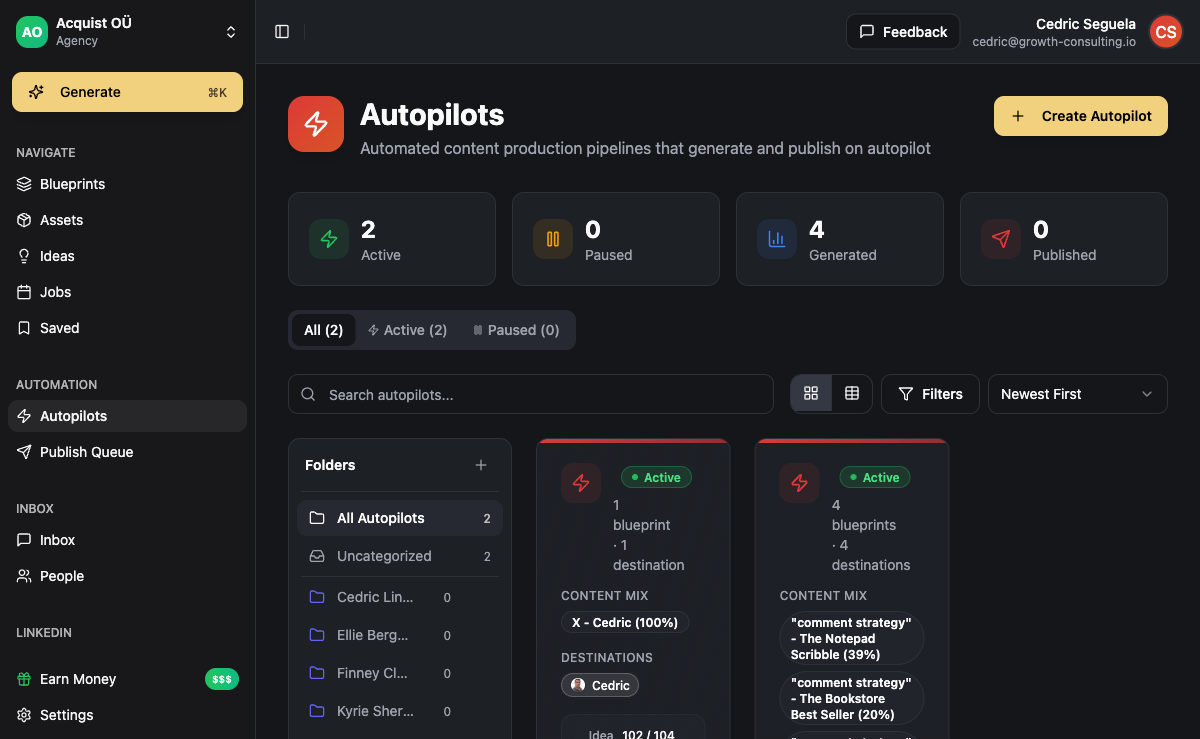
ACA Autopilot is built for this exact problem. You configure five things once: your brand voice, your content pillars, your themed weeks, your platforms, and your posting schedule. The Autopilot then runs the calendar end to end. It generates the post drafts in your voice, produces the visuals (text posts, carousels, short videos), and schedules them across LinkedIn, Instagram, X, and email.
What you actually do each week is review, not create. Open the calendar, scroll through the queued posts, approve the ones that land, edit the ones that need a tweak, kill the ones that miss. Approval takes 10 to 15 minutes. Production takes zero.
The same engine works for client delivery. If you run an agency, you configure each client's pillars and voice once, and the Autopilot produces 20+ posts per month per client. One operator can run content for 10 to 15 clients without hiring writers. That is the leverage that turns content from a cost center into a margin line.
A working calendar template you can use today
Strip away the tooling and a working monthly calendar looks like this:
| Week | Theme | Mon (Education) | Tue (Opinion) | Wed (Proof) | Thu (Story) | Fri (Offer) |
|---|---|---|---|---|---|---|
| 1 | Lead gen | Cold email framework | Why LinkedIn DMs beat email in 2026 | Client campaign result | Our stack today | Join the community |
| 2 | Delivery | Onboarding checklist | Why most agencies churn clients | Retention case study | A delivery mistake we made | Book a call |
| 3 | Pricing | How to price retainers | Hourly pricing is broken | Pricing change result | How we doubled prices | Join the community |
| 4 | Scale | Hiring your first VA | Solo agencies are underrated | Operator hire result | Our org chart at $50k MRR | Book a call |
That is 20 posts, fully scoped, ready to draft. Apply this template to your own niche by swapping the pillars and themes. The structure carries over.
Build the calendar manually when: you are early stage, still finding your voice, and need to feel the response loop to learn what works.
Move to AI-generated when: you have a clear voice, defined pillars, and your time is worth more than the production cost. Most operators hit this transition once they cross 20 hours per week on non-content work.
Common mistakes that empty the calendar
Three patterns kill content calendars faster than anything else:
- Too many pillars. Founders try to be the expert on everything and end up associated with nothing. Five pillars maximum. Three is better.
- No theme structure. Without themed weeks, every post requires a fresh decision about what to talk about. Decision fatigue ends the calendar.
- No production engine. Manual writing is sustainable for about three weeks. After that, real life shows up and the calendar empties. Either batch hard or automate. There is no third option.
The calendar is not a discipline problem. It is a systems problem. Solve the system and the discipline becomes irrelevant.
Frequently asked questions
How many posts per week should a content calendar contain?
For LinkedIn and X, 5 posts per week per platform is the sweet spot for B2B founders and agencies. For Instagram, 3 to 5 posts plus daily stories. For TikTok or Reels, daily if you are leaning into short-form video. The exact number matters less than consistency. A calendar with 3 posts per week shipped every week beats a calendar with 7 posts per week shipped for two weeks then abandoned.
How far in advance should I plan my content calendar?
Plan the structure (pillars, themes) for the full quarter. Plan the actual post topics one month at a time. Draft and schedule one week ahead. Going further than a month on specific posts is wasted effort because your business will surface fresher angles you will want to use.
Can one calendar work across LinkedIn, Instagram, and X?
The strategy stays the same across platforms. The format does not. The same pillar and theme structure works everywhere, but a LinkedIn post is 1200 characters of structured copy, an X post is 280 characters with a sharper hook, and an Instagram post is visual-first with the copy in the caption. Use the calendar as the planning layer and adapt the format per platform.
How do I keep content fresh after 6 months of the same pillars?
The pillars stay the same. The angles within each pillar evolve as your business does. New client wins create new proof posts. New mistakes create new behind-the-scenes posts. New industry shifts create new opinion posts. If your pillars feel stale at month 6, the problem is usually that you have stopped doing new things in your business, not that the pillars themselves need replacing.
What is the fastest way to fill a calendar from zero?
Pick three pillars (not five, to keep it simple to start). Pick one theme for the next four weeks. Batch one week of five posts in 90 minutes. Schedule them. Repeat next week. After four weeks you have 20 posts published, real data on what worked, and a calendar habit. That is the only fast path. Skip any step and you are back to an empty calendar in three weeks.
Does AI-generated content actually sound like me?
Only if the engine is configured with your voice properly. The mistake people make is dropping generic prompts into ChatGPT and posting the output. That sounds like ChatGPT. A properly configured content engine uses your previous posts, your specific phrases, your tone markers, and your topic positions as training context. The output reads like you wrote it tired but in your own style. ACA Autopilot is built around this configuration layer, which is why approval-instead-of-creation is the workflow.