
Most AI content tools produce one format at a time. Type a prompt, get a LinkedIn post. Type another, get an image caption. Each output is disconnected from the last, and the results drift. Multi-format AI content works differently: one brief - one set of inputs covering brand voice, character, target ICP, and knowledge base - generates coordinated text, image, video, and audio outputs that look and sound like the same creator. That is not a convenience feature. It is what separates on-brand content at scale from AI slop.
Short answer: Multi-format AI content is a production approach where a single brief generates all four content formats - text (posts, emails, scripts), images (graphics, thumbnails), video (short-form clips), and audio (TTS voiceovers) - using the same brand voice, character, and knowledge base. The outputs are coordinated by design, not assembled after the fact. ACA runs this as a sequential pipeline: text first, then image derived from the text, then video script condensed from the text, then audio from the script.
What Multi-Format AI Content Actually Is
Most teams treat content formats as separate workstreams. The copywriter writes the LinkedIn post. The designer makes the graphic. Someone else records a voiceover. Each person works from their own interpretation of the brief, and the outputs drift - sometimes subtly, sometimes completely.
Multi-format AI content collapses that into one pipeline. You define your inputs once - the brand voice, the character who delivers the content, the product knowledge base, the ICP you are targeting - and a generation job produces all four formats from those shared inputs.
The outputs reference the same facts, use the same tone, and follow the same narrative arc. The image illustrates the text's central claim. The video script reads like a tightened version of the post. The audio is the video script delivered in your brand's voice. Nothing drifts because nothing is reassembled from scratch.
Content blueprint: A structured document that specifies the topic, the content character (who is speaking), the brand voice parameters, the knowledge base sources, and the output formats required. The generation pipeline runs each format as a stage - text first, then image prompt derived from the text, then video script from the text, then TTS audio from the script. Each downstream format inherits context from the upstream one. The result is four coordinated assets from one instruction set.
One Brief, Four Outputs: How the Pipeline Works
ACA's content pipeline runs in sequential stages. Each stage feeds the next, so the image is never disconnected from the text, and the video never sounds like it came from a different brief.
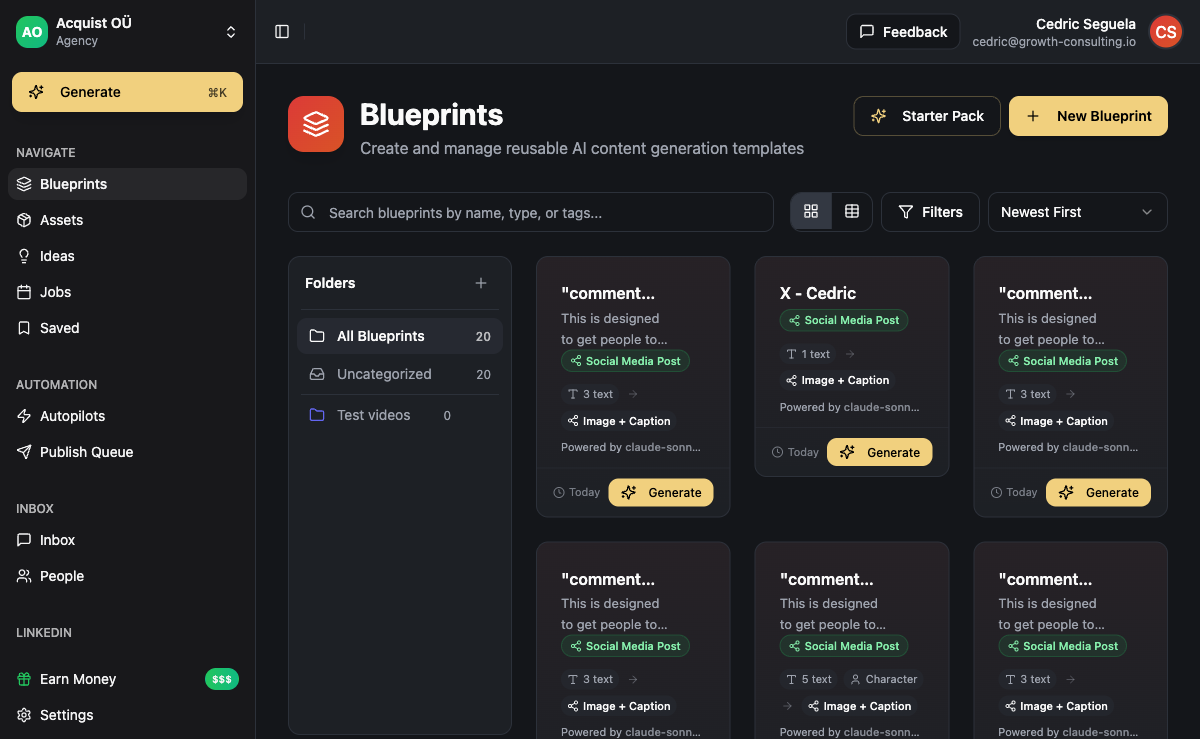
Stage 1 - Text generation: The pipeline reads the blueprint's brand voice, character, and knowledge base. It generates the long-form asset first - blog post, LinkedIn article, or email sequence - because this is the richest version of the idea. Text is the source of truth for the entire pipeline.
Stage 2 - Image: An image prompt is derived from the text's key claim and visual context from the blueprint. The image model receives that prompt along with style guidance from the brand's visual identity. The output is a graphic that reinforces the text's argument rather than a stock photo that could sit next to any post.
Stage 3 - Video script and composition: A short-form video script is condensed from the text. ACA uses Remotion - a React-based video framework - to compose the actual video from the script, the image assets, and motion templates. The video is portrait-format for LinkedIn, Instagram, and TikTok, or landscape for YouTube.
Stage 4 - TTS audio: The video script or a standalone audio script is sent to a TTS model that applies the brand voice's vocal parameters. The output is a polished audio clip suitable for podcast intros, video voiceovers, or LinkedIn voice messages sent via Unipile.
Four formats. One brief. The character who delivers the message is consistent across all of them.
Why Characters Matter in Multi-Format Content
A character is a configurable content persona with a name, speaking style, point of view, and topic set. When a pipeline runs with a character assigned, all outputs are filtered through that character's voice - not a generic AI voice, not "professional tone," but a defined persona with opinions and a track record.
For agencies, characters are how you produce distinct-sounding content for 10 clients without the copy blending together. Each client gets their own character. The character's knowledge base is populated with client-specific case studies, product descriptions, and messaging frameworks. The content sounds like the client because it is grounded in the client's material, not because you wrote a particularly detailed system prompt this time.
Selling AI content services without a system that enforces brand voice means rebuilding the client's persona from scratch every run. ACA's characters store that persona once and apply it across every format, every generation job.
Why Consistency Across Formats Is the Hard Problem
Generating one AI post is easy. Generating 100 posts that sound like the same person on the same mission, delivered in four different formats, across a full quarter of content - that is the actual challenge no single-format tool is designed to solve.
The failure mode for most AI content workflows: the text sounds like a thought leader, the image looks like a stock photo, the video script sounds like a generic explainer, and the audio has a different vocal cadence than any of the other assets. Prospects who encounter all four pieces cannot tell they came from the same company.
Consistency is not just aesthetics. In B2B outreach, a prospect might see your LinkedIn post, then receive a cold email, then see a retargeted video ad. If those three pieces do not reinforce each other's messaging, each touchpoint has to do all the persuasion work alone. If they are coordinated, each touchpoint builds on the previous one. This is why Cedric's experience building outbound systems for agencies consistently shows that coordinated multi-format campaigns require fewer follow-up touches per conversion than single-format approaches.
Revision rate benchmark: In our experience running content pipelines for B2B agencies, teams using a single brief-to-all-formats pipeline maintain brand voice consistency across 80-90% of outputs on first client review. Teams assembling formats separately typically need 2-3 revision rounds per format per month to re-align voice and messaging. The pipeline approach eliminates most of that rework - and the time savings compound across a full client roster.
The Four Output Types in Practice
Text is the anchor. It is where the argument is made at full length - the LinkedIn article, the cold email sequence copy, the blog post, the case study summary. Text is also the most linkable and SEO-indexable format, which is why it anchors the pipeline and drives every other output format. If you are running AI-driven cold email campaigns, the sequence copy comes directly from the text stage of the blueprint.
Image is the distribution multiplier. A LinkedIn post with a native image gets meaningfully higher reach than a text-only post - LinkedIn's own published engagement data supports this, and in our experience managing LinkedIn campaigns for agencies it holds up consistently. For agencies producing LinkedIn content for multiple clients, consistent-quality images at scale are a production bottleneck that multi-format AI pipelines solve directly.
Video is the highest-trust format. Short-form video - 30 to 90 seconds - conveys authority and personality in a way text cannot. Produced at scale with a consistent character and brand aesthetic, video differentiates an agency's client output from competitors running text-only campaigns. ACA's Remotion integration handles the composition so you are not assembling video manually in CapCut or Premiere for each client.
Audio/TTS is the underused format in B2B. Podcast clips, voice messages in LinkedIn DMs via Unipile's API, and audio overlays in video posts consistently deliver higher engagement than their text equivalents in most outreach contexts we have tracked. Adding audio to a multi-format pipeline is low marginal cost once the script already exists from Stage 4.
Multi-Format vs. Single-Format Tools
Most AI content tools focus on one format. That is fine for a one-person team writing their own content. For agencies producing across multiple clients and multiple formats, single-format tools multiply the coordination overhead rather than reducing it. Here is how the comparison breaks down:
| Tool | Formats generated | Brand voice learning | Outreach integration | Agency white-label |
|---|---|---|---|---|
| ACA | Text + Image + Video + Audio | Yes - brand voices, characters, knowledge base | Yes - connected to campaign builder | Yes - per-client workspaces |
| Taplio | Text (LinkedIn only) | Limited | No | No |
| Jasper / Copy.ai | Text only | Basic tone settings | No | No |
| Buffer | Scheduling only (no generation) | No | No | Limited |
Taplio writes LinkedIn posts. ACA does that plus outreach, email, CRM, and white-label workspaces. The full AI content tool comparison breaks down more platforms side by side with pricing and use cases.
When to Use Each Format for B2B Outreach
Not every campaign needs all four formats. Here is how to match format to use case:
Use text when: the idea requires explanation, SEO value matters, you are sending email copy, writing LinkedIn articles, or producing long-form thought leadership that establishes authority over time. Text scales the best for outbound sales automation - email sequences, connection message templates, and follow-up variants all come from the text stage of the pipeline.
Use image when: you need organic reach on LinkedIn or Instagram, you want to reinforce a claim visually, or you are running a paid social campaign that requires creative variety. Images produced from the same brief as the post copy outperform generic stock images on engagement because they are specifically designed to illustrate the post's central argument.
Use video when: you are running top-of-funnel awareness campaigns, showcasing a product demo, or sending cold video outreach sequences. Video is also the right format for content repurposing - one text piece generates multiple video variations at different angles for different audience segments without repeating the same script.
Use audio when: you are sending LinkedIn voice messages via Unipile, creating podcast clip content, adding a voiceover to a video, or producing audio-first content for platforms where audio engagement outperforms text. In multi-channel outreach sequences, a voice message touch point on LinkedIn significantly increases response rates compared to a third or fourth text message to the same prospect.
Frequently Asked Questions
How many formats can I generate from one brief in ACA?
ACA's pipeline supports four output formats from a single blueprint: text (long-form), image (static graphic), video (short-form Remotion composition), and audio (TTS voiceover or standalone clip). You can enable all four or select only the formats relevant to the campaign. If you only need text and image for a specific client, the pipeline skips the video and audio stages entirely.
Does multi-format AI content work for different clients simultaneously?
Yes. ACA's workspace isolation means each client has their own blueprint library, brand voices, characters, and knowledge base. A generation job for Client A draws only from Client A's inputs. Outputs for different clients never cross-contaminate. You can run generation jobs for multiple clients in parallel from a single agency seat without any risk of mixing up brand voices or source material.
How does ACA keep the AI from generating generic content?
The knowledge base is the key input that prevents generic output. Each blueprint references specific product details, case studies, and ICP pain points stored in the client's knowledge base. The generation stages retrieve relevant knowledge base context before writing - this is a retrieval-augmented generation (RAG) approach. Generic prompts produce generic content. Prompts grounded in client-specific knowledge produce content that reads like the client actually wrote it, not like a marketing intern with a ChatGPT tab open.
What video format does ACA generate?
ACA uses Remotion - a React-based video renderer - to compose short-form videos from a script, image assets, and motion templates. Outputs are portrait 9:16 for LinkedIn, Instagram, and TikTok, or landscape 16:9 for YouTube. The composition is defined by a Remotion template that agencies can customize to match the client's brand aesthetic - colors, typography, logo placement, and motion style are all configurable.
Can I use multi-format AI content for cold outreach sequences?
Yes. ACA connects the content pipeline directly to the campaign builder. A generated LinkedIn post can be scheduled for organic distribution on the same day a cold email sequence starts. A generated video can be sent as a LinkedIn DM via Unipile. A TTS audio clip becomes a voice message touch point in a multi-step sequence. For more on how the outreach side works end to end, see the guide to AI-driven cold email.