
If your outbound setup requires logging into three separate dashboards to see whether one prospect has replied, you are not running automation. You are running manual work with extra steps. Most tools marketed as outbound automation are sequence schedulers dressed up in a dashboard. They send emails. That is it. Winning B2B outbound in 2026 requires something different: AI-generated content that sounds human, multi-channel routing that meets buyers where they are, and a unified inbox that collapses all replies into one place. This guide covers how that actually works - and why the math on consolidating your stack lands heavily in favor of doing it sooner than later.
What Is Outbound Sales Automation?
Outbound sales automation is the process of systematically reaching out to potential buyers across multiple channels - LinkedIn, email, WhatsApp, Instagram, and others - using software to handle sequencing, timing, personalization, reply detection, and CRM updates.
The key word is systematic. A working outbound automation setup does not just send emails. It:
- Scores and filters leads before they enter sequences, so you only contact people who match your ICP
- Generates personalized messages using AI trained on your brand voice, not generic prompts copied from a template library
- Routes leads across channels based on engagement signals - connected on LinkedIn? Move to direct message. No email open in five days? Switch to WhatsApp
- Detects replies and pauses sequences automatically so you are not sending a follow-up to someone who already replied
- Logs all activity to your CRM without requiring manual data entry
Most tools marketed as outbound automation handle only the sequencing layer. Lead scoring, content generation, multi-channel routing, and inbox management - you are still doing those manually or patching them together with four other tools.
That is the gap sequence builders have never filled. And it is exactly where the real work happens.
Why Single-Channel Automation Fails in 2026
Cold email alone is harder than it was two years ago. Google and Yahoo tightened sender requirements in 2024. Inbox placement algorithms have become more aggressive at filtering anything that reads like bulk outreach. Buyers have trained themselves to ignore messages that follow an obvious template pattern.
LinkedIn alone runs into different problems: connection request limits, message throttling, and a growing share of your target audience who have learned to ignore automated connection notes.
In our experience running multi-channel sequences across B2B campaigns, single-channel outreach consistently underperforms against properly configured multi-channel sequences targeting the same ICP. The gap is not marginal. The reason is not complicated: your prospect is active on multiple platforms, and you are showing up on only one.
Multi-channel does not mean blasting the same message everywhere simultaneously. It means sequencing intelligently: start on the channel with the highest trust signal for your ICP, escalate to secondary channels based on engagement signals, and stop the moment a reply comes in.
See how that works end-to-end: multi-channel outreach across LinkedIn, email, and WhatsApp.
The Multi-Channel Outbound Model
ACA supports six outbound channels natively: LinkedIn, email, WhatsApp, Instagram, Telegram, and SMS. Most B2B campaigns run a two or three channel stack depending on where the target ICP actually lives.
The sequence builder uses a visual node editor - start node, action nodes (connection request, message, email, WhatsApp), delay nodes, and conditional branches that route leads based on whether they connected, opened, replied, or ignored the previous step. The logic runs automatically. You configure it once.
Layer 1: LinkedIn Sequences
LinkedIn is the highest-trust channel for B2B outbound. A connection request followed by a direct message sequence outperforms cold email on the first touch because the prospect can see your profile, your activity, and your mutual connections before deciding whether to respond. There is social context that email lacks entirely.
A standard LinkedIn sequence runs: connection request (with or without a note, depending on your ICP and the volume you are running) - wait for acceptance - message 1 - 3 to 5 day delay - message 2 - if no reply, escalate to email or InMail.
ACA's LinkedIn automation runs through Unipile, a cloud-native API integration. Not a Chrome extension that logs into your browser and triggers LinkedIn's bot detection. Cloud-native means the automation runs from servers, not your local machine, with configurable daily limits that stay within safe usage ranges for accounts in good standing.
For a full breakdown of what safe LinkedIn automation looks like in practice: LinkedIn outreach automation that works without getting banned.
Layer 2: Cold Email
Email is the volume channel. You can reach a meaningfully larger audience per day via email than via LinkedIn - LinkedIn's safe daily limits for connection requests are tight. The tradeoff is lower inherent trust and significantly more infrastructure complexity.
For cold email to land in primary inboxes in 2026, you need:
- Domain infrastructure: SPF, DKIM, and DMARC configured correctly on every sending domain - not just your main domain, but every subdomain or alternate domain you use for outreach
- Domain warm-up: 2 to 4 weeks of low-volume sending activity before ramping any campaign, to establish sender reputation with inbox providers
- Inbox rotation: distribute volume across multiple sending accounts so no single account triggers volume-based filters
- AI-generated personalization: subject lines and opening lines that reference something specific to the prospect, not merge-tag patterns that inbox filters have already learned to identify
Deliverability is infrastructure, not a setting you toggle on. A perfectly written sequence landing in spam converts at zero. Complete setup instructions: cold email deliverability technical guide.
Layer 3: WhatsApp, Instagram, and Beyond
WhatsApp and Instagram DM have open rates that email cannot match for specific ICPs: agencies, coaches, consultants, e-commerce brands, and B2B buyers in markets where messaging apps are the primary professional communication channel.
The use case: a prospect is warm - visited your profile, engaged with a LinkedIn post, replied to a comment - but has not responded on LinkedIn or email after seven to ten days. A WhatsApp message from a business account, in that context, gets opened at rates that make the channel worth adding to your stack.
ACA routes WhatsApp and Instagram through Unipile's business account integrations, with the same sequence logic - conditional branching, delay nodes, reply detection - governing LinkedIn and email. There is no separate tool to manage. All six channels run from the same campaign builder with one unified inbox collecting all replies.
AI-Generated Personalization at Scale
The standard personalization in most outreach tools is merge-tag substitution: first name, company name, industry, job title. Buyers have learned to read through it. The message still reads like a template with the blanks filled in - because that is exactly what it is.
AI-generated personalization is structurally different. It uses three layers:
Brand voice training. ACA learns the specific tone, cadence, sentence length, and vocabulary of your brand - or your client's brand - and generates messages that sound like that person wrote them. Not "Hello {{first_name}}, I came across your profile and wanted to reach out." The AI writes the way the sender actually writes.
ICP grounding. Before generating a message, the AI receives the prospect's ICP profile: their role, industry, company size, and the pain points most common to that archetype. The message reflects specific context about what that buyer actually cares about, not generic outreach framing.
Knowledge base retrieval. ACA can pull in relevant context from your knowledge base per prospect - case studies for their specific industry, product features relevant to their role, objection handling language calibrated to their likely resistance. The AI does not hallucinate this context; it generates from what you have given it.
The output reads like it was researched and written individually. Because from the AI's perspective, it was. For how this applies specifically to email sequences: AI cold email at scale without killing deliverability.
The Four Layers of a Working Outbound Stack
Most sequence tools cover one of these four layers. A complete outbound automation stack covers all of them.
Layer 1 - Lead Intelligence. Finding, enriching, and scoring leads before they enter sequences. This means pulling contact data, enriching with company information, and running ICP scoring to filter out leads who do not match your criteria before any message is sent. Sending sequences to unqualified leads is the fastest way to burn sender reputation, waste campaign budget, and generate reply rates that make it look like the channel does not work - when the real problem is targeting.
ACA's built-in AI SDR handles ICP scoring natively. Set your target criteria and the system scores imported leads before outreach starts. More on what an AI SDR does end-to-end: replace your SDR with an AI agent.
Layer 2 - Content Generation. Writing the actual messages. This is where most tools stop at merge tags. AI-generated personalization using brand voices, ICP profiles, and knowledge base context produces messages that convert at meaningfully higher rates than template-based outreach, because they do not read like template-based outreach.
Layer 3 - Multi-Channel Delivery. The sequencing engine itself. Delay nodes, conditional branches, channel switching, rate limits, schedule management across multiple accounts and channels running simultaneously. This is the part most sequence builders have actually built - it is table stakes, not differentiation.
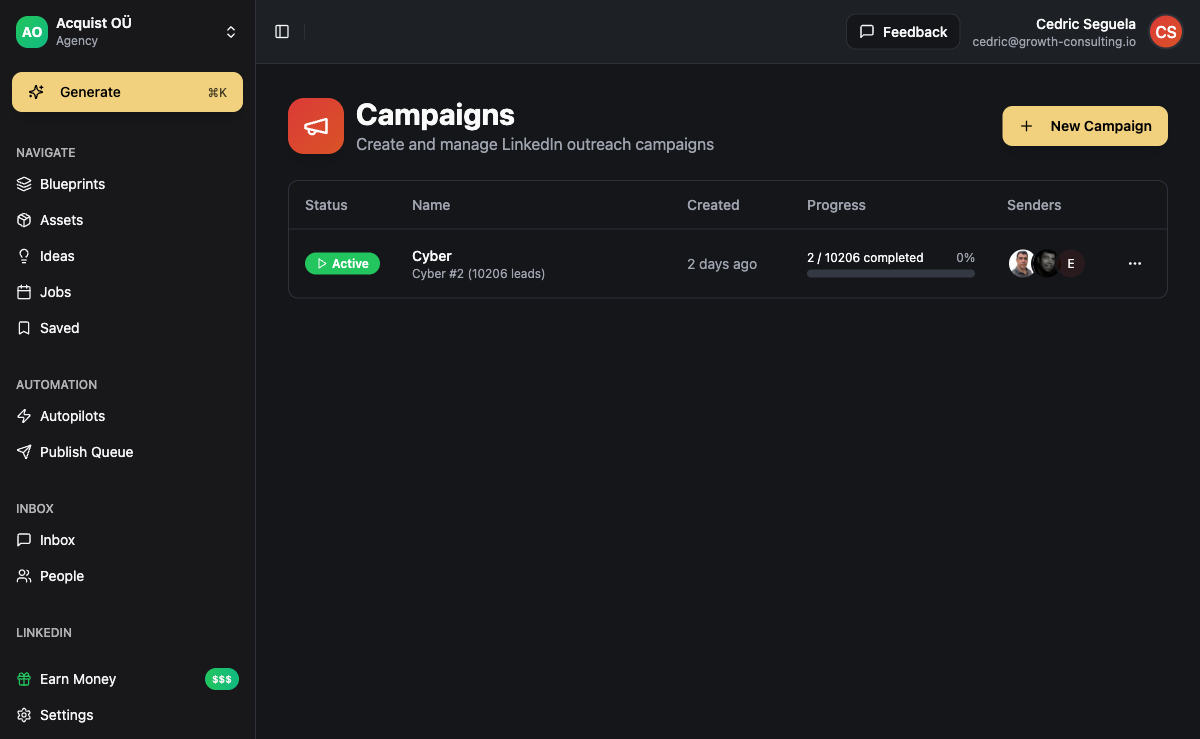
Layer 4 - Response Management. A unified inbox that aggregates all replies across every channel, pauses sequences the moment a reply is detected, and logs the conversation to your CRM. This is where the most manual work still lives in fragmented stacks - replies scattered across LinkedIn messages, Gmail, and WhatsApp, with no single view of the full interaction history.
How to Set Up a Multi-Channel Outbound Sequence
Here is the step-by-step setup process in ACA for a LinkedIn plus email sequence targeting B2B buyers.
Step 1: Connect your outreach accounts. LinkedIn connects through Unipile - cloud-native, no Chrome extension, no local login. Email domains connect via SMTP/IMAP. WhatsApp connects through WhatsApp Business API. Each account gets its own daily limit configuration.
Step 2: Import and enrich your lead list. Upload your prospect CSV or pull directly from your CRM integration. ACA's enrichment layer adds missing fields - company size, industry, LinkedIn URL - and runs ICP scoring to flag leads that match your target profile. Unqualified leads can be filtered out before any sequence starts.
Step 3: Build your sequence in the visual campaign builder. Start node - LinkedIn connection request - 3-day delay - condition node (accepted? yes/no) - LinkedIn message (if yes), email outreach (if no) - 5-day delay - email follow-up - end node. You can add as many branches, channel switches, and delay variations as the campaign needs. The logic executes automatically.
Step 4: Write message templates with AI brand voice. In each message node, you configure which brand voice to use, which ICP profile applies, and what context from your knowledge base is relevant. ACA generates a personalized version of each message for each lead at send time - not a template with fields filled in.
Step 5: Set channel limits and scheduling windows. LinkedIn has strict daily caps; configure these based on the account's standing and age. Email volume depends on warm-up stage. Set sending windows to business hours in your target timezone so messages arrive when prospects are likely to be checking their accounts.
Step 6: Launch with a test batch. Start with 20 to 50 leads to validate message quality and reply rates before scaling. ACA's campaign analytics show open rates, reply rates, LinkedIn connection acceptance rates, and sequence drop-off at every step. Use the first 5-7 days of data to optimize before increasing volume.
ROI Math: What to Expect from Outbound Automation
The numbers depend heavily on ICP quality, message quality, and channel mix. These are realistic ranges based on what we see across campaigns:
- LinkedIn connection acceptance rate: 25-45% (varies by niche, personalization quality, and whether the connection note is included)
- LinkedIn reply rate on direct messages after connection: 8-20%
- Cold email reply rate with deliverability infrastructure set up correctly: 3-8%
- WhatsApp reply rates for warm B2B contacts: meaningfully higher than cold email; varies significantly by industry and relationship context
At the conservative end of a LinkedIn plus email sequence with 500 contacts per month:
- 125 to 225 LinkedIn connections accepted
- 25 to 65 LinkedIn replies
- 15 to 40 email replies
- Combined: 40 to 100 conversations opened from 500 contacts
What percentage of those conversations turn into qualified calls depends entirely on ICP targeting quality. With tight ICP scoring, 30 to 50% of replies lead to discovery calls. With loose targeting, that number drops significantly - and that drop shows up as a "channel problem" when the actual problem is targeting.
The stack cost math. Running outbound with a fragmented tool stack - Instantly or Smartlead for email, HeyReach or Expandi for LinkedIn, Clay for enrichment, a separate AI writer, a CRM, and an inbox aggregator - costs $800 to $1,500 per month in combined SaaS subscriptions, before accounting for the time cost of operating seven separate platforms.
ACA consolidates email sequencing, LinkedIn automation, WhatsApp and Instagram messaging, AI content generation, unified inbox, and CRM into one platform. The economics of consolidation typically break even or win by month two, and the compounding effect of having all channel data in one place - for reporting, optimization, and coaching - adds value that fragmented stacks cannot replicate.
Side-by-side comparison of the leading platforms: best multi-channel outreach tools in 2026.
Outbound Automation for Agencies
Agencies running outbound for clients have requirements that go beyond what solo operators need. The infrastructure has to support multiple clients simultaneously, with complete data isolation between them.
Per-client workspace isolation. Each client needs their own LinkedIn accounts, email sending domains, lead lists, campaign data, and reporting. Shared infrastructure creates compliance risk and makes performance reporting across clients impossible. ACA's white-label architecture gives each client a fully isolated workspace, managed from your central agency account.
Branded client-facing experience. Clients see your agency's branding, not the underlying platform. If you want to position the outbound system as your proprietary tech, ACA's white-label setup supports that completely. The infrastructure is ACA; the brand is yours.
Resellable delivery margin. You sell the outreach service at a retainer price you set. Your delivery cost is your ACA subscription, which scales more efficiently than running separate tool stacks per client. With five clients each paying $3,000 per month, delivery costs using a consolidated platform are a fraction of what you would spend running independent Instantly plus HeyReach plus Clay plus inbox tool stacks for each client.
Campaign reporting across all clients. ACA's analytics give you per-client views of all active campaigns - reply rates, meeting bookings, sequence performance at each step. Pull weekly reports for every client from one dashboard without logging into separate accounts.
For how AI-powered outbound fits into a full agency lead generation model: B2B lead generation with AI for agencies.
Five Failure Modes That Kill Outbound Automation
Most outbound automation failures trace back to one of these five root causes. All five are avoidable with the right setup.
1. No ICP scoring before sequences start. Sending campaigns to everyone who matches a broad job title filter produces low reply rates, high spam complaints, and wasted budget. Define specific ICP criteria - company size range, industry vertical, funding stage, tech stack signals - and score leads before they enter any sequence. Tight targeting with lower volume consistently outperforms broad targeting with high volume.
2. Skipping deliverability infrastructure. Launching email campaigns without SPF, DKIM, and DMARC configured, without domain warm-up, and without inbox rotation means a significant share of your emails land in spam or get blocked entirely. You will not know this is happening from open rate data, because emails that never arrive do not show as bounces. They just disappear. Set up your sending infrastructure before you launch. The complete cold email deliverability guide covers the full technical setup.
3. Generic AI content with no brand voice configuration. Using a generic AI writer with no voice training, no ICP grounding, and no context produces output that reads exactly like AI-generated outreach. Recipients recognize the pattern. Train your brand voice on actual writing samples, configure ICP profiles with real pain points, and test message variants on real humans before launching at scale.
4. Single-channel campaigns when your ICP is active on multiple platforms. If your target buyer is regularly active on LinkedIn and reachable via WhatsApp but your sequences are email-only, you are using a fraction of the available touchpoints. Start with the channel that carries the most trust signal for your specific ICP, layer in secondary channels for non-responders, and let the sequence logic handle routing automatically.
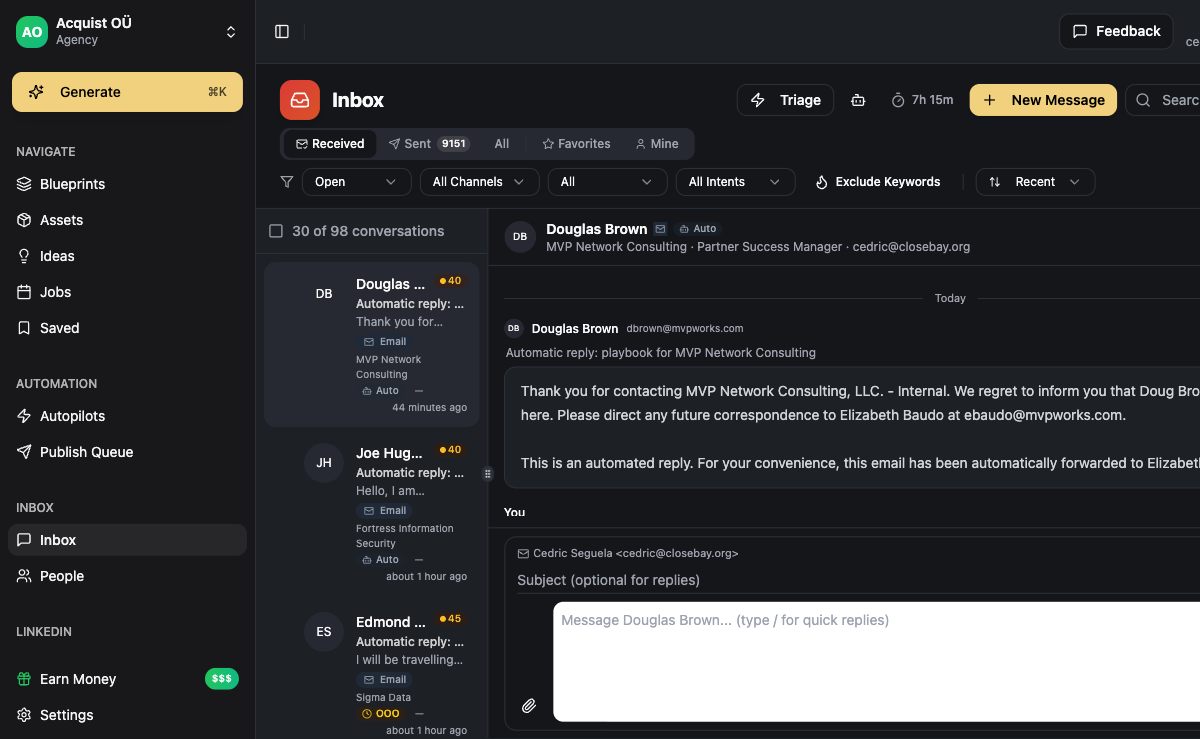
5. No unified inbox, or slow reply handling. Replies scattered across LinkedIn messages, Gmail, and WhatsApp business accounts with no single place to see them means missed responses - and a missed reply 24 to 48 hours after it arrives kills deals at the highest-leverage moment in the entire sequence. ACA's unified inbox aggregates all replies in one view across all channels, with automatic sequence pausing when a reply is detected. The moment a prospect responds, they stop receiving follow-ups and your team gets a notification.
FAQ
What is the difference between outbound sales automation and a CRM?
A CRM stores and organizes contact data, activity history, and deal pipeline. Outbound sales automation is the system that sends messages across channels, manages sequences, and routes leads based on engagement. They work together: the automation populates the CRM with activity data; the CRM provides context for targeting and personalization. ACA combines both so you are not manually syncing data between separate platforms.
Is outbound sales automation legal?
Email outreach is legal in most jurisdictions with proper opt-out mechanisms and accurate sender identification (CAN-SPAM in the US, GDPR in the EU for commercial email to business contacts). LinkedIn automation exists in a grayer area - LinkedIn's terms prohibit scraping and mass automation via third-party tools, but cloud-native integrations that use official API connections operate differently from browser extensions. ACA runs LinkedIn through Unipile's official integrations. WhatsApp Business API is legitimate for B2B outreach with proper account setup and message template approval. Review the specific regulations for your target geography before launching.
How many leads can I contact per day safely?
LinkedIn: 20 to 50 connection requests per day is generally safe for accounts in good standing. New accounts should ramp more gradually, starting at 10 to 15 per day for the first few weeks. Email: a properly warmed domain with good sender reputation can handle 100 to 200 sends per day per sending account - spread across multiple accounts for higher total volume. WhatsApp Business: volume limits depend on your account tier and message template approval status, which WhatsApp sets based on account quality history.
What is the best outbound sales automation software for agencies?
The core question is how many channels and capabilities the platform covers natively. Single-channel tools - email-only or LinkedIn-only - force you to run multiple stacks per client, which multiplies cost and management overhead. ACA covers six channels plus AI content generation, white-label workspaces, unified inbox, and built-in CRM. For a side-by-side comparison of the leading platforms across these dimensions: best multi-channel outreach tools compared.
How long does it take to see results from outbound automation?
With email, allow 2 to 4 weeks for domain warm-up before running volume, then expect the first meaningful reply data within 5 to 10 business days of launching sequences. LinkedIn campaigns typically produce replies within the first week, since connection acceptance and response happen in near real-time. The optimization cycle - testing subject lines, message variants, ICP criteria - typically runs 3 to 6 weeks before you have enough data to make meaningful improvements. Month 2 of a well-configured campaign consistently outperforms month 1.